> ## Documentation Index
> Fetch the complete documentation index at: https://docs.starknet.io/llms.txt
> Use this file to discover all available pages before exploring further.
# StarkGate
## Overview
[StarkGate](https://starkgate.starknet.io), developed by StarkWare, bridges ETH and ERC-20 tokens between Ethereum and Starknet. Its various [components](#components) enable anyone to easily [deposit funds to Starknet (with and without a message attached), withdraw funds to Ethereum, and add a token to StarkGate](#procedures).
Following [Maker DAO's announcement](https://twitter.com/MakerDAO/status/1746977683190251591?s=20), StarkWare launched a new set of DAI bridge and token contracts under StarkGate. This new DAI token retains the same contract 'symbol' and 'name' as the existing one, and to differentiate between the two, the old DAI is referred to as “DAI v0” while the new DAI is simply referred to as “DAI”.
Withdrawal of DAI v0 tokens is still possible with no limitations, but depositing DAI v0 using the DAI v0 bridge is disabled. Users are **strongly** encouraged to migrate to the new DAI token, as it cannot support StarkGate's latest features (such as Smart Deposits and Withdrawal Limits) and will stop being compatible with Starknet altogether over time.
To migrate from DAI v0 to DAI, either swap your DAI v0 for DAI using one of Starknet's [swap apps and aggregators](https://www.starknet.io/dapps/?type=live\&tags=216) or withdraw your current DAI v0 tokens to L1 using and re-deposit them using StarkGate (which automatically issues the new DAI).
## Components
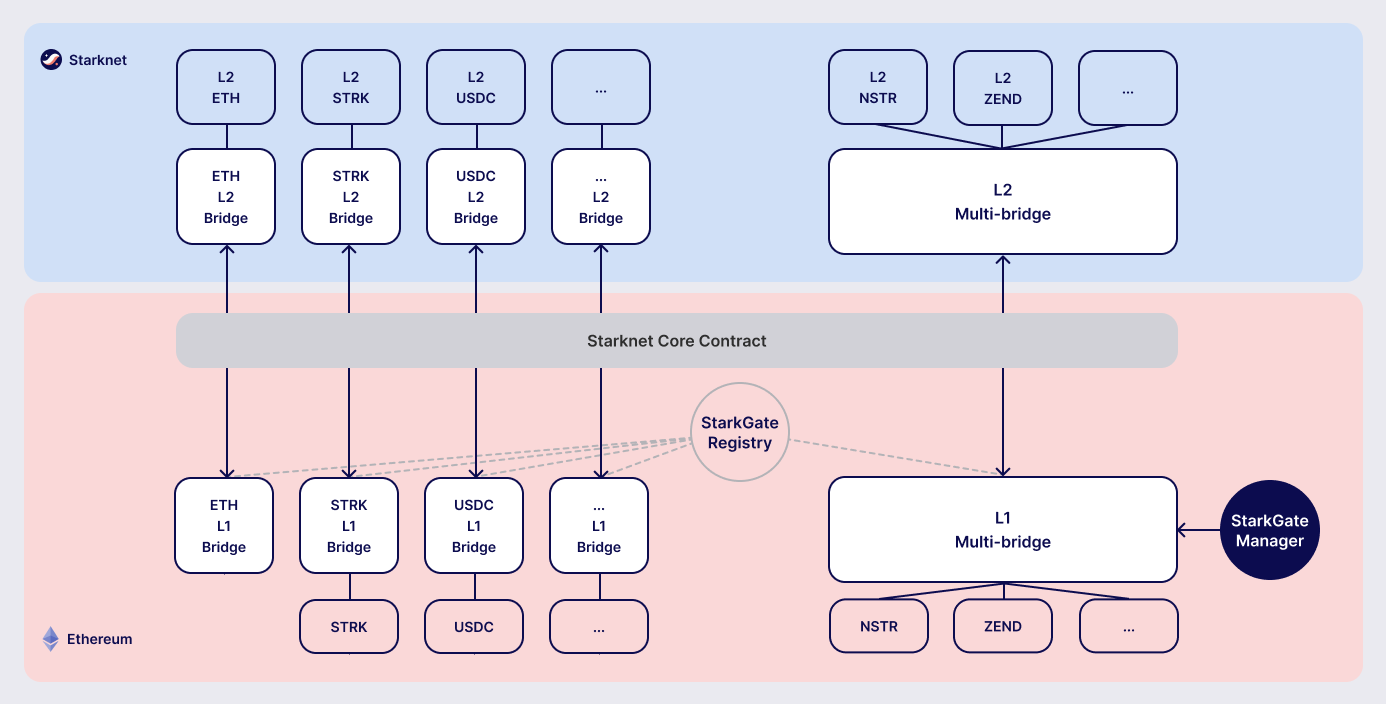
The following table details StarkGate's key components:
| Contract | Description |
| ---------------------------------------- | ------------------------------------------------------------------------------------------------------------------------------------------------------------------------------------------------------------ |
| Starknet Token Bridge(on both L1 and L2) | The primary StarkGate bridge contract, where the main user bridge functionality are defined. |
| Starkgate Manager | Responsible for adding tokens to the multi-bridge. |
| Starkgate Registry | Contains the addresses of all supported bridges and tokens and enables to stop servicing an existing bridge.An interface to the Starkgate Registry is available through IStarkgateRegistry.sol. |
| Starkgate Service | An interface to check if a contract is servicing a token. |
In addition, prior to StarkGate 2.0 (Mainnet: January 2024) tokens were bridged with a unique and custom pair of L1 and L2 bridge contracts, where the L1 contract is an instance of [`LegacyBridge.sol`](https://github.com/starknet-io/starkgate-contracts/blob/cairo-1/src/solidity/LegacyBridge.sol) and the L2 contract is an instance of [`legacy_bridge_eic.cairo`](https://github.com/starknet-io/starkgate-contracts/blob/cairo-1/src/cairo/legacy_bridge_eic.cairo). These legacy token bridges are supported by StarkGate 2.0 in a fully backward-compatible fashion.
For example, the [L1 bridge contract for USDC](https://etherscan.io/address/0xf6080d9fbeebcd44d89affbfd42f098cbff92816#writeProxyContract) has the following two `deposit` functions:
| | |
| ------------------------- | ------------------------------------------------------------------------------------------------------------------------------------------------------------------------------------------------------------------------------------------------ |
| deposit
(0x0efe6a8b) | The multi-bridge contract, which includes support for all tokens within a single contract, requiring that you enter the address of the token in the deposit function. |
| deposit
(0xe2bbb158) | The legacy contract, which is labeled Support Legacy ABI. This function does not include the token (address) parameter, because the contract that contains this function only supports USDC. Therefore, the address of the token is superfluous. |
For the complete list of legacy bridges, see the [`bridged_tokens`](https://github.com/starknet-io/starknet-addresses/tree/master/bridged_tokens) directory on GitHub.
The following is an overall illustration of StarkGate's various components:
 ## Procedures
The following sections detail the procedures enabled by StarkGate, along with the instructions to perform them.
For adding a token to Starknet, see [Joel Mun's blog](https://9oelm.github.io/2024-03-28-making-sense-of-starknet-architecture-and-l1-l2-messaging/#enroll-a-token-bridge). Note that enrolling a new bridge does not add it to StarkGate's GUI.
All procedures are subject to [fees](/learn/protocol/messaging/#l1-l2-message-fees) to account for L1→L2 message costs. Fees for depositing funds or enrolling a token bridge on StarkGate can be estimated using the [`estimateDepositFeeWei`](/learn/cheatsheets/starkgate-reference/#estimateDepositFeeWei) or [`estimateEnrollmentFeeWei`](/learn/cheatsheets/starkgate-reference/#estimateEnrollmentFeeWei) function.
To invoke onchain contracts, use [Starknet Foundry's `sncast`](https://foundry-rs.github.io/starknet-foundry/starknet/sncast-overview.html), [Starkli](../cheatsheets/tools), or a [block explorer](../cheatsheets/integrations). To get the onchain addresses of StarkGate's contracts, see [Important addresses](/learn/cheatsheets/chain-info/#starkgate).
For more information on StarkGate's various functions, see [StarkGate functions and events](/learn/cheatsheets/starkgate-reference/).
### Depositing funds
Using StarkGate to deposit L1 funds into the L2 Starknet requires StarkGate's `deposit` function. The `deposit` function does the following:
1. Transfers the funds from the user's Ethereum account to the StarkGate L1 contract.
2. Emits a `Deposit` event that includes the L1 and L2 addresses of the user, and the amount deposited.
3. Sends a message to the corresponding L2 bridge with the amount deposited, and the recipient's address.
Subsequently, the funds should be transferred to Starknet so that you can begin using them.
For more information on what happens during the transfer process, see [Deposit lifecycle](#deposit_lifecycle).
#### Cancelling a deposit
To ensure self-custody, StarkGate enables you to cancel a deposit if, after depositing funds with the `deposit` function on L1, you don't see your funds appear on L2 within a reasonable amount of time.
In order to guard against an attack, it takes approximately five days to cancel a deposit. From the moment StarkGate receives the cancellation request, a counter begins. When exactly five days have passed, and the funds still do not appear on L2, you can reclaim the deposit.
To cancel a deposit, call the `depositCancelRequest` request function. When StarkGate receives the cancellation request, a counter begins to count five days. When exactly five days have passed, and the funds still do not appear on L2, you can reclaim the deposit by calling `depositReclaim`.
As long as the `depositReclaim` was not performed, the deposit may be processed, even if the cancellation delay time has already passed. Only the depositor is allowed to cancel a deposit, and only before depositReclaim was performed.
#### Depositing funds with a message
A deposit with a message is a deposit that moves funds from L1 to L2 and then triggers subsequent actions. For example, a user can deposit funds and transfer those funds to another recipient, such as an exchange.
The `depositWithMessage` function enables sending a deposit with a message. `depositWithMessage` is similar to the `deposit` function, with an additional 256-bit message, which can contain instructions for executing additional actions.
Upon completion, the `depositWithMessage` function triggers a call to a callback function, named `on_receive`, on the L2 contract that receives the deposit. The `on_receive` function receives the deposit message as input.
`on_receive` must return `true` for the deposit to succeed. If `on_receive` returns `false`, or if the recipient contract does not include the `on_receive` function, the `depositWithMessage` function's L1 handler fails. The user can recover their funds using the `depositWithMessageCancelRequest` function.
To enable deposits with messages in your application:
1. Implement the `on_receive` function in the L2 contract that should receive deposits.
2. Use the `depositWithMessage` function to transfer funds from L1 to L2.
#### Deposit lifecycle
Step 1: Initiating a deposit on L1
1. A call to the L1 `deposit` function initiates a deposit.
2. The function does the following:
* Transfers the funds from the user's account to the Starknet bridge.
* Emits a `Deposit` event that includes the L1 and L2 addresses of the user, and the amount deposited.
* Sends a message to the corresponding L2 bridge with the amount deposited, and the recipient's address.
Starknet's sequencer is now aware of the deposit transaction.
3. The sequencer waits for enough L1 block confirmations to fill its quota to run before the corresponding deposit transaction is initiated on L2. During this period of time, the status of the L2 deposit transaction is [`NOT_RECEIVED`](/learn/protocol/transactions/#transaction_lifecycle).
Step 2: Triggering a deposit on L2
1. The sequencers refer to the deposit request by triggering the L1 handler using the [`handle_deposit`](https://github.com/starkware-libs/starkgate-contracts/blob/28f4032b101003b2c6682d753ea61c86b732012c/src/starkware/starknet/apps/starkgate/cairo/token_bridge.cairo#L135) function on the L2 bridge.
2. The `handle_deposit` function verifies that the deposit indeed came from the corresponding L1 bridge. It then calls the relevant token's contract on Starknet and mints the specified amount of the token on L2 for the user.
3. The sequencers complete constructing the block.
The status of the deposit request is now [`ACCEPTED_ON_L2`](/learn/protocol/transactions/#transaction_lifecycle).
Step 3: Proving the block that includes the deposit
1. Starknet's provers prove the validity of the block and submit a state update to L1.
2. The message confirming transfer of the funds is cleared from the Starknet Core Contract, and the fact that the user has transferred their funds is part of the now finalized state of Starknet.
If the message wasn't on L1 to begin with, that is, if the deposit request was fraudulently created on Starknet, the state update fails.
### Withdrawing funds
Using StarkGate to withdraw funds from Starknet requires StarkGate's `initiate_token_withdraw` function to initiate a withdrawal. The function does the following:
* Burns the transferred amount of tokens from the L2 balance of the withdrawal's initiator.
* Sends a message to the relevant L1 bridge with the amount to be transferred and the recipient's Ethereum address.
Subsequently, the funds should be transferred to the recipient's Ethereum address, and should be available after the next L1 state update.
For more information on what happens during the transfer process, see [Withdrawal lifecycle](#withdrawal_lifecycle).
#### Withdrawal limit
By default, StarkGate imposes no limit on withdrawals. However, in order to mitigate risks associated with critical vulnerabilities that could result in the loss of user funds, StarkGate can enable a withdrawal limit.
If a serious security issue arises, the security agent in the StarkGate contract can limit withdrawals to 5% of the Total Value Locked (TVL) per day for any affected token by calling the `setWithdrawLimitPCT()` function in the `WithdrawalLimit.sol` contract. A dedicated team can then investigate and resolve the issue.
Only a security admin quorum can disable the withdrawal limit. The quorum will consist of Starknet Foundation members, Starknet ecosystem contributors, and StarkWare representatives. This diverse group will ensure that decisions reflect the Starknet community's broad interests.
This approach, blending manual oversight with automated detection, aims to minimize potential losses.
#### Withdrawal lifecycle
Step 1: Initiating a withdrawal on L2
1. A call to the L2 `initiate_token_withdraw` function initiates a withdrawal.
2. The function does the following:
* Burns the transferred amount of tokens from the balance of the withdrawal's initiator.
* Sends a message to the relevant L1 bridge with the amount to be transferred and the recipient's address.
Step 2: Proving the block that includes the withdrawal
1. The sequencer completes the block construction
2. Starknet's provers prove the validity of the block and submit a state update to L1.
3. The message from the previous step is stored in the Starknet Core Contract.
Step 3: Transferring the funds on L1
After the withdrawal message has been recorded on the Starknet Core Contract, anyone can finalize the transfer on L1 from the bridge back to the user, by calling the `withdraw` function.
This step is permissionless, anyone can do it. The recipient's address is part of the recorded message on L1, so they receive the funds regardless of who calls the `withdraw` function on L1.
## Procedures
The following sections detail the procedures enabled by StarkGate, along with the instructions to perform them.
For adding a token to Starknet, see [Joel Mun's blog](https://9oelm.github.io/2024-03-28-making-sense-of-starknet-architecture-and-l1-l2-messaging/#enroll-a-token-bridge). Note that enrolling a new bridge does not add it to StarkGate's GUI.
All procedures are subject to [fees](/learn/protocol/messaging/#l1-l2-message-fees) to account for L1→L2 message costs. Fees for depositing funds or enrolling a token bridge on StarkGate can be estimated using the [`estimateDepositFeeWei`](/learn/cheatsheets/starkgate-reference/#estimateDepositFeeWei) or [`estimateEnrollmentFeeWei`](/learn/cheatsheets/starkgate-reference/#estimateEnrollmentFeeWei) function.
To invoke onchain contracts, use [Starknet Foundry's `sncast`](https://foundry-rs.github.io/starknet-foundry/starknet/sncast-overview.html), [Starkli](../cheatsheets/tools), or a [block explorer](../cheatsheets/integrations). To get the onchain addresses of StarkGate's contracts, see [Important addresses](/learn/cheatsheets/chain-info/#starkgate).
For more information on StarkGate's various functions, see [StarkGate functions and events](/learn/cheatsheets/starkgate-reference/).
### Depositing funds
Using StarkGate to deposit L1 funds into the L2 Starknet requires StarkGate's `deposit` function. The `deposit` function does the following:
1. Transfers the funds from the user's Ethereum account to the StarkGate L1 contract.
2. Emits a `Deposit` event that includes the L1 and L2 addresses of the user, and the amount deposited.
3. Sends a message to the corresponding L2 bridge with the amount deposited, and the recipient's address.
Subsequently, the funds should be transferred to Starknet so that you can begin using them.
For more information on what happens during the transfer process, see [Deposit lifecycle](#deposit_lifecycle).
#### Cancelling a deposit
To ensure self-custody, StarkGate enables you to cancel a deposit if, after depositing funds with the `deposit` function on L1, you don't see your funds appear on L2 within a reasonable amount of time.
In order to guard against an attack, it takes approximately five days to cancel a deposit. From the moment StarkGate receives the cancellation request, a counter begins. When exactly five days have passed, and the funds still do not appear on L2, you can reclaim the deposit.
To cancel a deposit, call the `depositCancelRequest` request function. When StarkGate receives the cancellation request, a counter begins to count five days. When exactly five days have passed, and the funds still do not appear on L2, you can reclaim the deposit by calling `depositReclaim`.
As long as the `depositReclaim` was not performed, the deposit may be processed, even if the cancellation delay time has already passed. Only the depositor is allowed to cancel a deposit, and only before depositReclaim was performed.
#### Depositing funds with a message
A deposit with a message is a deposit that moves funds from L1 to L2 and then triggers subsequent actions. For example, a user can deposit funds and transfer those funds to another recipient, such as an exchange.
The `depositWithMessage` function enables sending a deposit with a message. `depositWithMessage` is similar to the `deposit` function, with an additional 256-bit message, which can contain instructions for executing additional actions.
Upon completion, the `depositWithMessage` function triggers a call to a callback function, named `on_receive`, on the L2 contract that receives the deposit. The `on_receive` function receives the deposit message as input.
`on_receive` must return `true` for the deposit to succeed. If `on_receive` returns `false`, or if the recipient contract does not include the `on_receive` function, the `depositWithMessage` function's L1 handler fails. The user can recover their funds using the `depositWithMessageCancelRequest` function.
To enable deposits with messages in your application:
1. Implement the `on_receive` function in the L2 contract that should receive deposits.
2. Use the `depositWithMessage` function to transfer funds from L1 to L2.
#### Deposit lifecycle
Step 1: Initiating a deposit on L1
1. A call to the L1 `deposit` function initiates a deposit.
2. The function does the following:
* Transfers the funds from the user's account to the Starknet bridge.
* Emits a `Deposit` event that includes the L1 and L2 addresses of the user, and the amount deposited.
* Sends a message to the corresponding L2 bridge with the amount deposited, and the recipient's address.
Starknet's sequencer is now aware of the deposit transaction.
3. The sequencer waits for enough L1 block confirmations to fill its quota to run before the corresponding deposit transaction is initiated on L2. During this period of time, the status of the L2 deposit transaction is [`NOT_RECEIVED`](/learn/protocol/transactions/#transaction_lifecycle).
Step 2: Triggering a deposit on L2
1. The sequencers refer to the deposit request by triggering the L1 handler using the [`handle_deposit`](https://github.com/starkware-libs/starkgate-contracts/blob/28f4032b101003b2c6682d753ea61c86b732012c/src/starkware/starknet/apps/starkgate/cairo/token_bridge.cairo#L135) function on the L2 bridge.
2. The `handle_deposit` function verifies that the deposit indeed came from the corresponding L1 bridge. It then calls the relevant token's contract on Starknet and mints the specified amount of the token on L2 for the user.
3. The sequencers complete constructing the block.
The status of the deposit request is now [`ACCEPTED_ON_L2`](/learn/protocol/transactions/#transaction_lifecycle).
Step 3: Proving the block that includes the deposit
1. Starknet's provers prove the validity of the block and submit a state update to L1.
2. The message confirming transfer of the funds is cleared from the Starknet Core Contract, and the fact that the user has transferred their funds is part of the now finalized state of Starknet.
If the message wasn't on L1 to begin with, that is, if the deposit request was fraudulently created on Starknet, the state update fails.
### Withdrawing funds
Using StarkGate to withdraw funds from Starknet requires StarkGate's `initiate_token_withdraw` function to initiate a withdrawal. The function does the following:
* Burns the transferred amount of tokens from the L2 balance of the withdrawal's initiator.
* Sends a message to the relevant L1 bridge with the amount to be transferred and the recipient's Ethereum address.
Subsequently, the funds should be transferred to the recipient's Ethereum address, and should be available after the next L1 state update.
For more information on what happens during the transfer process, see [Withdrawal lifecycle](#withdrawal_lifecycle).
#### Withdrawal limit
By default, StarkGate imposes no limit on withdrawals. However, in order to mitigate risks associated with critical vulnerabilities that could result in the loss of user funds, StarkGate can enable a withdrawal limit.
If a serious security issue arises, the security agent in the StarkGate contract can limit withdrawals to 5% of the Total Value Locked (TVL) per day for any affected token by calling the `setWithdrawLimitPCT()` function in the `WithdrawalLimit.sol` contract. A dedicated team can then investigate and resolve the issue.
Only a security admin quorum can disable the withdrawal limit. The quorum will consist of Starknet Foundation members, Starknet ecosystem contributors, and StarkWare representatives. This diverse group will ensure that decisions reflect the Starknet community's broad interests.
This approach, blending manual oversight with automated detection, aims to minimize potential losses.
#### Withdrawal lifecycle
Step 1: Initiating a withdrawal on L2
1. A call to the L2 `initiate_token_withdraw` function initiates a withdrawal.
2. The function does the following:
* Burns the transferred amount of tokens from the balance of the withdrawal's initiator.
* Sends a message to the relevant L1 bridge with the amount to be transferred and the recipient's address.
Step 2: Proving the block that includes the withdrawal
1. The sequencer completes the block construction
2. Starknet's provers prove the validity of the block and submit a state update to L1.
3. The message from the previous step is stored in the Starknet Core Contract.
Step 3: Transferring the funds on L1
After the withdrawal message has been recorded on the Starknet Core Contract, anyone can finalize the transfer on L1 from the bridge back to the user, by calling the `withdraw` function.
This step is permissionless, anyone can do it. The recipient's address is part of the recorded message on L1, so they receive the funds regardless of who calls the `withdraw` function on L1.