> ## Documentation Index
> Fetch the complete documentation index at: https://docs.starknet.io/llms.txt
> Use this file to discover all available pages before exploring further.
# ADD Opcode Walkthrough
To better understand how `Opcode` components work, let's walk through the implementation of the `AddOpcode` component.
Above is the list of all the columns used in the `AddOpcode` component. Note that the `dst_val`, `op0_val`, and `op1_val` columns are actually 28 columns each (to support 28 9-bit limbs), but we show them as single columns for brevity.
To reiterate what an `Opcode` component does from the [Main Components](../main-components/index#opcode-component) section, it verifies the following:
1. The offsets and flag values are correct using the `VerifyInstruction` component.
2. The instruction is correctly mapped to the current `Opcode` component using the flags.
3. The operand values `op0`, `op1`, and `dst` computed with the registers and the offsets are correct using the `Memory` component.
4. The operation for the current `Opcode` component is done correctly.
5. The state transition of the three registers (`pc`, `ap`, `fp`) is done correctly using the flags.
An instruction should contain 15 bits of flags but only 5 bits are represented in the `AddOpcode` columns.
Can you see why?
Check out how a Cairo instruction is pattern-matched to an `ADD` opcode [here](https://github.com/starkware-libs/stwo-cairo/blob/04f142e0376e2a0e797cdb64973449aa3e58a18f/stwo_cairo_prover/crates/adapter/src/opcodes.rs#L349).
Check out how the decomposition of the flags is verified [here](https://github.com/starkware-libs/stwo-cairo/blob/04f142e0376e2a0e797cdb64973449aa3e58a18f/stwo_cairo_prover/crates/cairo-air/src/components/subroutines/decode_instruction_bc3cd.rs#L59).
Items 1 and 3 should be familiar, as we already covered them in the [Main Components](../main-components/index#opcode-component) section. For item 2, you can check the specs for the `ADD` opcode [here](https://github.com/starkware-libs/stwo-cairo/blob/04f142e0376e2a0e797cdb64973449aa3e58a18f/stwo_cairo_prover/crates/adapter/src/opcodes.rs#L349). For item 5, the specs for a valid state transition can be found in Section 4.5 of the [Cairo paper](https://eprint.iacr.org/2021/1063.pdf).
In this section, we will focus on how item 4 is implemented.
## Adding two 252-bit integers
Assuming that the operands `op0`, `op1`, and `dst` are correctly accessed from the `Memory` table, we now check that the addition of two 252-bit integers is done correctly, i.e. `op0 + op1 = dst`. As noted in the [Felt252 to M31](../basic-building-blocks/index#felt252-to-m31) section, a 252-bit integer is stored as 28 9-bit limbs, so we need to check addition for each of the 28 limbs.
We will incrementally build up to the final constraint.
### Limb-wise Addition and Carry
To verify that the two sets of limbs are correctly added, we check limb-wise addition. Since each limb can create a carry, we also add the carry from the previous limb (except for the first limb). Thus, the constraints look like this:
```python theme={null}
carry_limb_1 = (op0[0] + op1[0] - dst[0]) / 2^9
carry_limb_1 * (carry_limb_1 - 1) = 0
carry_limb_2 = (op0[1] + op1[1] + carry_limb_1 - dst[1]) / 2^9
carry_limb_2 * (carry_limb_2 - 1) = 0
...
op0[27] + op1[27] + carry_limb_27 - dst[27] = 0
```
We divide `op0[0] + op1[0] - dst[0]` by `2^9` since this quantity is either `2^9` (if a carry exists) or `0` (if no carry exists). Dividing by `2^9` yields one or zero, respectively. To check that the carry is either `0` or `1`, we add the constraint `carry_limb_0 * (carry_limb_0 - 1) = 0`. For the final limb, we simply check that the addition is correct.
### Handling overflow beyond the 252-bit prime field
We also need to account for addition overflowing the 252-bit prime field `P` (i.e., `op0 + op1 = dst + P`). To check this, we introduce a witness variable `sub_p_bit`, a 1-bit value set to 1 if there is an overflow. Note that since `P = 2^251 + 17 * 2^192 + 1`, we only subtract in the three limbs where `P` has a non-zero limb: `0`, `22`, `27`.
Now let's revisit the constraints:
```python theme={null}
sub_p_bit * (sub_p_bit - 1) = 0
carry_limb_1 = (op0[0] + op1[0] - dst[0] - sub_p_bit) / 2^9
carry_limb_1 * (carry_limb_1 - 1) = 0
...
carry_limb_23 = (op0[22] + op1[22] + carry_limb_22 - dst[22] - sub_p_bit * 136) / 2^9
carry_limb_23 * (carry_limb_23 - 1) = 0
...
op0[27] + op1[27] + carry_limb_27 - dst[27] - sub_p_bit * 256 = 0
```
First, we verify that `sub_p_bit` is a bit. Then, we subtract `sub_p_bit` from the first limb, `sub_p_bit * 136` from the 22nd limb, and `sub_p_bit * 256` from the 27th limb. (Note that `136` and `256` are the values of `P` in the 22nd and 27th limbs, respectively.)
A caveat of this approach is that subtracting `sub_p_bit` can introduce an underflow, i.e., `(op0[0] + op1[0] - dst[0] - sub_p_bit) / 2^9 = -1`. This means that `carry_limb_0` can be `-1` as well as `0` or `1`. Thus, we update the constraint for all carries to the following:
```python theme={null}
...
carry_limb_1 * (carry_limb_1 - 1) * (carry_limb_1 + 1) = 0
...
```
### Optimization
To optimize the number of constraints, we can combine all the constraints for each limb into a single constraint. Naively checking that `carry_limb_1 = (op0[0] + op1[0] - dst[0] - sub_p_bit) / 2^9` would require a dedicated column for `carry_limb_1`. Instead, we keep `carry_limb_1` as an intermediate value and inline the equation when computing the next carry. For example, the second-limb carry is computed as follows:
```python theme={null}
carry_limb_2 = (op0[1] + op1[1] + ((op0[0] + op1[0] - dst[0] - sub_p_bit) / 2^9) - dst[1]) / 2^9
```
This way, we avoid allocating extra columns for the carries and proceed until the last limb, where we check that the giant equation is correct.
This is possible because the computation does not involve any multiplication of witness values, so the constraint degree does not blow up.
### Final constraint
One last note: in the implementation, we replace division by `2^9` with multiplication by `2^22`, which is equivalent in the M31 field since `2^9` and `2^22` are multiplicative inverses—i.e., `2^9 * 2^22 = 1 mod 2^31 - 1`.
So the final constraint looks like this:
```python theme={null}
sub_p_bit * (sub_p_bit - 1) = 0
carry_limb_1 = (op0[0] + op1[0] - dst[0] - sub_p_bit) * 2^22 // intermediate representation
carry_limb_1 * (carry_limb_1 - 1) * (carry_limb_1 + 1) = 0
...
carry_limb_27 = (op0[26] + op1[26] + carry_limb_26 - dst[26]) * 2^22 // intermediate representation
carry_limb_27 * (carry_limb_27 - 1) * (carry_limb_27 + 1) = 0
op0[27] + op1[27] + carry_limb_27 - dst[27] - sub_p_bit * 256 = 0
```
## Enabler column
Finally, we introduce the last column in the `AddOpcode` component: the `enabler` column. As the name suggests, this column enables or disables the constraint for the current row. It is used to support the dummy rows added to the end of the table to make the number of rows a power of two. In other words, it is set to `1` for all valid `ADD` opcode calls and `0` for all dummy rows.
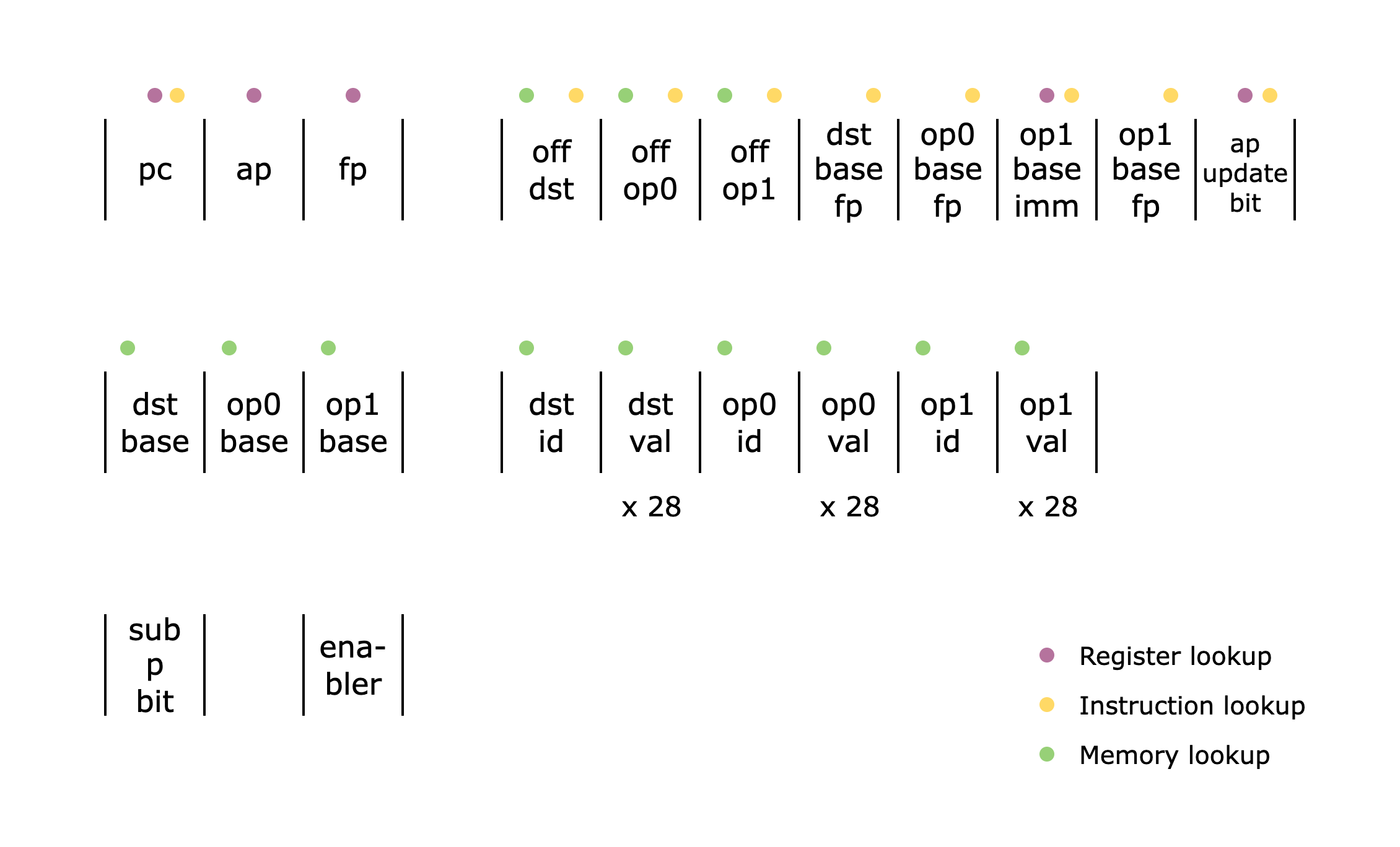 *Figure 1: The `AddOpcode` columns*